
What is MCP? A photographer's guide
MCP, the Model Context Protocol, is an open standard that lets AI assistants use an app through the “tools” it offers. Connect an assistant to a photo editor that supports MCP, and it can find, edit, and export photos in it.
- Yousay what you want
- AI assistantchooses the tools
- MCPconnects the two
- Lucarnedoes the editing
- Your photoson your Mac
How MCP works
Through MCP, an app offers a set of tools, such as “find photos”, “set exposure”, or “export”. You tell the assistant what you want in plain words, and it decides which tools to use and in what order, then works through them step by step.
Some of the tools Lucarne offers assistants:
Find photos
Search the library by date, camera, lens, rating, or tag.
Rate and flag
Add stars, pick, or reject.
Preview an edit
See the result and its statistics without changing the photo.
Apply an edit
Change any adjustment, recorded in the history.
AI selections
Find the subject, people, sky, or ground.
Apply a Look
Put one edit on many photos.
Export
With any settings or an export preset, frames and watermarks included.
Undo and redo
Step back or forward through changes.
Who supports MCP
Anthropic released MCP as an open standard in November 2024. Since December 2025 it has been looked after by a foundation within the Linux Foundation. Claude, ChatGPT, Gemini, Copilot, Cursor, and others support it, and more and more apps offer MCP servers.
Local and online MCP servers
An MCP server can run on your own computer or on the internet. For photos, the difference matters:
Local server
Runs on your computer and works on the photos in your library, right where they are.
Online server
Runs on the internet and works on the images you upload or give it.
Lucarne’s MCP server is built into the app and runs on your Mac.
What it means for photographers
Until now, if you asked an AI assistant how to fix a photo, it could only give advice; the work was yours. With MCP you can simply say “the sky is too bright, bring it down and keep the people natural”, and it selects the sky, adjusts, previews, checks, and finishes the job. Sorting a shoot, applying a look to the picks, exporting at the right size: you ask for each in one sentence.
Try it
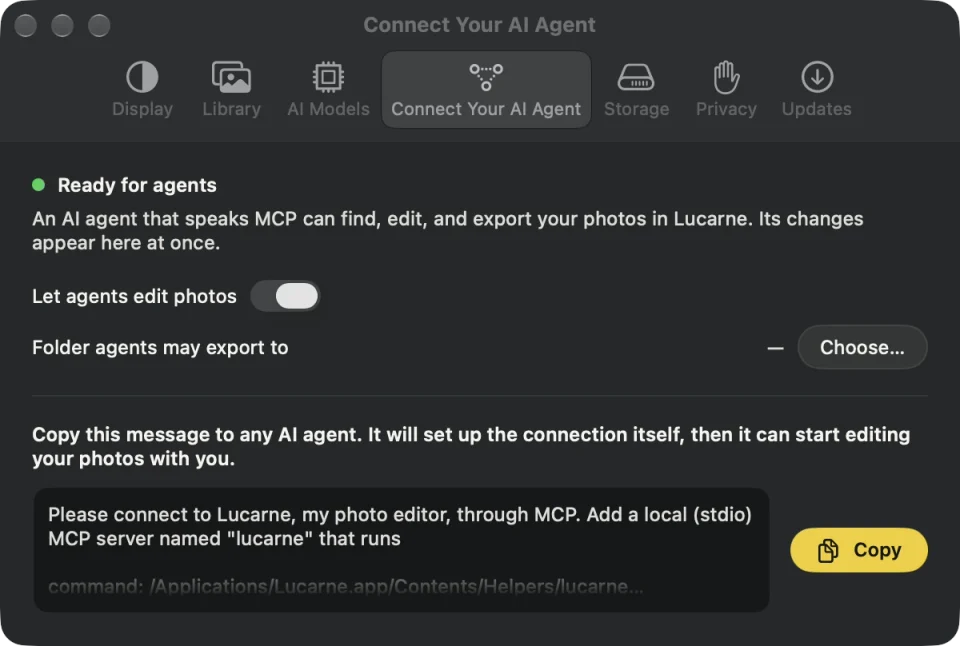
Lucarne is a free photo editor for the Mac with an MCP server built in. Open Settings in Lucarne, choose Connect Your AI Agent, copy the message, and send it to your assistant. See Let your AI assistant edit your photos.
Questions
- Do I need to code to use MCP?
- No. In Lucarne, you copy a message to your assistant, and it sets up the connection itself.
- Is it safe?
- In Lucarne, you decide whether an assistant may edit photos and which folder it may export to, and every change it makes is recorded in the history.
- Which assistants support it?
- Assistants that can run a local MCP server, such as Claude Desktop, Cursor, and LM Studio.
- Does MCP cost anything?
- MCP is an open standard and free. Lucarne is free too.